I went through 9 Twitter bookmark managers on what each one actually does, to find the ones that solve the recall problem rather than the saving one.
There are now dozens of tools claiming to fix Twitter’s bookmark page. Most of them solve the wrong thing. The problem isn’t that bookmarks are disorganized. The problem is you can’t find the tweet you’re looking for when you need it. That’s a search problem, not a folder problem.
This post ranks the 9 tools that are still worth using in 2026, based on what they actually do well. Skip to the comparison table if you want the verdict in one screen.
Want the tweet back, not a folder to file it in? ContextBolt won this comparison. It is a free Chrome extension that captures every X bookmark as you save it, tags it by topic, and finds it again from a few words. Reddit and LinkedIn saves land in the same library. Basic is free up to 150 bookmarks. Pro is $6 a month for unlimited bookmarks and an MCP endpoint, so Claude can search them too.
Add ContextBolt to Chrome, freeThe other eight are ranked below, with who each one is actually for.
- ContextBolt won overall. It AI-tags every save and ships an MCP endpoint into Claude on Pro with semantic search behind it. Basic is free.
- Dewey fits if you want folders and a media backup of each tweet.
- TweetSmash wins if you live in Notion.
- Mailbrew wins if you prefer reading bookmarks as a newsletter.
- Pick by what you optimize for. Retrieval is the problem most people arrive with, and that is ContextBolt’s job.
How we picked these Twitter bookmark managers
Here’s what I looked for in each tool. Use these criteria to choose your own pick if my ranking doesn’t match your priorities.
- Search quality: Can you actually find a tweet by topic, not just exact words?
- Capture method: Does the tool capture bookmarks automatically, or do you have to save them twice?
- Cross-platform: Does it handle Reddit, LinkedIn, or web bookmarks too, or only X?
- Deletion resilience: What happens if the tweet gets deleted after you save it?
- Workflow integration: Does it plug into Notion, Claude, Cursor, or your existing setup?
- Pricing fairness: Is the free tier usable, and does the paid tier feel proportionate to the value?
I excluded tools that have shut down (Pocket, July 2025), tools that no longer support X (a few legacy options), and tools that are fundamentally social posting platforms with bookmarks as an afterthought.
Twitter bookmark managers: head-to-head comparison
| Tool | Best for | Free tier | Semantic search (Pro) | MCP / AI | Multi-platform |
|---|---|---|---|---|---|
| ContextBolt | AI search + Claude | Yes (150-bookmark cap) | Yes | MCP endpoint | X + Reddit + LinkedIn |
| Dewey | Organization + archive | Free plan | Keyword | Not verified | X + LinkedIn + Bluesky |
| TweetSmash | Notion users | No | Limited | Cmd+K AI search | X only |
| Mailbrew | Email digests | No | No | Not verified | X + RSS + more |
| Raindrop.io | General bookmarking | Yes (generous) | Stella AI (Pro) | Own MCP server | Any URL |
| Readwise | Heavy readers | Trial only | Ghostreader | Own MCP server | X + Kindle + articles |
| Taplio | Content creators | No | Inspiration AI | Not verified | X + LinkedIn |
| Circleboom | Twitter management suite | Limited | No | Not verified | X only |
| X Premium folders | Under 50 bookmarks | Premium only | No | No | X only |
The 9 best Twitter bookmark managers
Each write-up below comes from what the product actually does today and the job it was built for, not from importing one library into all nine. Here’s how each one performed.
1. ContextBolt
Best for AI search + MCPFull disclosure, ContextBolt is ours. I’ll be honest about where it’s strong and where it isn’t.
ContextBolt is a Chrome extension that captures your bookmarks automatically when you visit your X bookmarks page. Every bookmark is tagged by topic using AI and indexed on your device for instant, typo-tolerant search. Because that search covers the tags, “fundraising” finds a tweet that never used the word. Semantic search over embeddings runs through the Pro MCP endpoint.
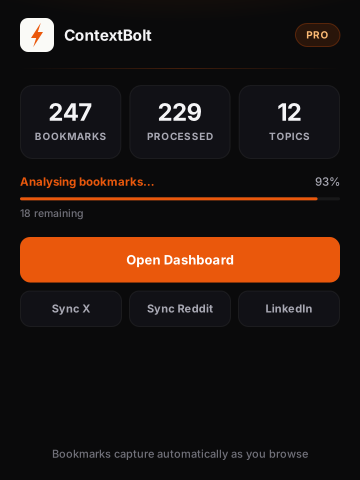
The ContextBolt popup shows how many bookmarks you have, how many the AI has tagged, and how many topics it found. The three buttons force a full re-sync of X, Reddit or LinkedIn.
Raindrop and Readwise have shipped agent access of their own since, so an MCP endpoint is no longer rare. What is still rare is what sits behind ours, your X, Reddit and LinkedIn saves captured automatically rather than filed by hand. On Pro, your entire bookmark collection becomes a live tool inside Claude Desktop, Cursor, or any MCP-compatible AI. You can ask Claude what you’ve saved about any topic, mid-conversation, without leaving your workflow.
It also captures bookmarks from Reddit and LinkedIn into the same searchable knowledge base. None of the Twitter-specific tools do this.
One thing to know. It keeps a saved post’s content if the original is deleted, though not the media, which makes Dewey’s per-tweet backup the deeper evidence archive, and it is a library rather than a delivery pipe, so email digests and Notion sync are other tools’ jobs. Its job is finding the tweet again.
- AI tags on every save, searched on-device
- AI auto-tagging, no manual work
- Cross-platform (X + Reddit + LinkedIn)
- MCP endpoint for AI tools
- Free Basic is capped at 150 bookmarks
- Local-first storage
- Keeps a deleted post’s content but not its media; Dewey’s per-tweet backup goes deeper
- A library, not a delivery pipe, so no email digest or Notion export
- MCP requires Pro ($6/mo)
Best for: Power users of X, Reddit, and LinkedIn who want instant recall across all their saves, and anyone using Claude or Cursor who wants their bookmarks available mid-conversation.
Pricing: Free Basic, capped at 150 bookmarks. Pro is $6/month for unlimited bookmarks, cloud sync, and MCP access.
Verdict: the pick if retrieval is your problem and you use an AI tool day-to-day, because nothing else here captures X, Reddit and LinkedIn into one library you can then ask questions of. Basic is free with no account, so try it on your next bookmark.
2. Dewey
Best for organization + archiveDewey started as a Twitter bookmark manager in 2021 and has since expanded to LinkedIn, Bluesky, and basic web bookmarks. It’s the most established tool in the category and has the most features for manual organization.
The standout feature is that Dewey saves a copy of each tweet when you bookmark it. If the original gets deleted, you still have it. That’s genuinely useful for researchers and journalists who need a defensible archive.
Search is solid for keyword matching. You can filter by tag, username, or date range. Whether it searches by meaning is not something we have verified, so plan on remembering specific words from the tweet to find it. For collections of more than a few hundred bookmarks, this becomes the bottleneck.
- Captures deleted tweets
- Folder and tag system
- CSV export
- Multi-platform (LinkedIn, Bluesky)
- Media backup (images, videos)
- Search is keyword-first
- Manual tagging required
- Pro is $10/month, against $6 for ContextBolt Pro
Best for: Researchers, journalists, and anyone who wants a manually curated, defensible archive. Not ideal if you want the filing done for you.
Pricing: Free plan, then Pro at $10/month, or $7.50/month billed annually.
Verdict: If you’re saving tweets for citation or evidence, Dewey is the right tool. The deleted-tweet capture alone justifies it for that use case. Finding one again by topic is the part it leaves to you.
3. TweetSmash
Best for Notion usersTweetSmash takes a different angle. Rather than building a search interface, it surfaces your bookmarks in email digests and pipes them into Notion or Google Sheets. The Cmd+K AI search is a useful touch.
TweetSmash is really a delivery mechanism, not an archive. It works best if you want bookmarks pushed to you on a schedule or dropped into an existing workflow. If a tweet gets deleted after you bookmark it, there’s no copy saved. That’s a meaningful limitation if you’re archiving anything that might disappear.
- Email digests (daily or weekly)
- Notion and Google Sheets export
- Cmd+K AI search
- Simple setup
- No local copy of deleted tweets
- Twitter only
- Limited without an existing Notion setup
Best for: People who already use Notion as their knowledge base and want bookmarks automatically added to it.
Pricing: Paid plans only, with tiered pricing based on bookmark volume and export frequency.
Verdict: If your second brain lives in Notion, TweetSmash is the cleanest bridge. If you want a search-first tool, this isn’t it.
4. Mailbrew
Best for newsletter-style digestsMailbrew isn’t a dedicated Twitter bookmark manager, but it earns a place on this list because it solves a different version of the same problem. Mailbrew aggregates content from Twitter, RSS, Reddit, and other sources into a custom newsletter that lands in your inbox.
You can configure it to surface tweets from accounts you follow, your bookmarks, or specific topics, then read them at your own pace. It’s the closest thing to a “Twitter bookmark inbox” you can build without code. The downside is that it’s a consumption tool, not a retrieval tool. There’s no search across past digests.
- Custom newsletter from any source
- Daily, weekly, or weekend digests
- Mixes Twitter with RSS, Reddit, weather, calendar
- Polished email format
- No retrieval or search
- Past digests aren’t a searchable archive
- Paid only
- More about reading than recall
Best for: People who want to read their Twitter saves like a newsletter, on a schedule, in their inbox.
Pricing: Paid plans only, typically in the $9-15/month range.
Verdict: Use this alongside a search tool, not instead of one. It’s a consumption layer, not a database.
5. Raindrop.io
Best for general bookmarkingRaindrop.io is the most polished general-purpose bookmark manager. It handles any URL, has browser extensions on every platform, and gives you folders, tags, and full-text search on premium. You can save tweets the same way you save any other URL.
The catch with Raindrop for Twitter specifically is that it stores the URL and a snapshot of the page metadata, not the full tweet content as a structured object. Threads aren’t captured in full. If the tweet gets deleted, you lose the content. Stella, its Pro AI, answers questions about the links you filed, and it cannot see a bookmark you never clipped.
Those gaps are the usual reason people go looking elsewhere, and there are more. Our roundup of the best Raindrop alternatives ranks eight tools by the specific thing Raindrop does not do for you.
- Generous free tier
- Works for any URL, not just Twitter
- Browser extensions on every platform
- Polished mobile and desktop apps
- No Twitter-specific capture
- AI search and full-text search are Pro only
- Loses content if the tweet is deleted
Best for: People who already save articles, videos, and links in Raindrop and want their tweets in the same library.
Pricing: Free tier is genuinely useful. Pro is $3/month, or $28/year. Verified September 10, 2026.
Verdict: Great general bookmark manager. Not the right tool if Twitter is your main source.
6. Readwise
Best for heavy readersReadwise is built around highlights from books and articles, but it has a Twitter integration that pulls in liked tweets and threads you save through their bot. Everything lands in your highlight library alongside Kindle, Pocket replacements, and articles you read in Reader (their read-later app).
Their Ghostreader feature does AI summarization and Q&A across your highlights. It’s not the same as ContextBolt’s AI tagging and MCP search, but it’s the closest thing in the Readwise ecosystem.
If you’re already deep in Readwise for your reading life, adding Twitter is natural. If you’re not, the cost and complexity of Readwise just for tweets is hard to justify.
- Pulls liked tweets and saved threads
- Combines Twitter with books, articles, podcasts
- Daily review of past highlights
- Ghostreader AI features
- Twitter is a small part of the product
- Paid only, around $10/month
- Not a dedicated bookmark tool
Best for: Existing Readwise users who want their tweets in the same highlight pipeline as their reading.
Pricing: Around $10/month after a free trial.
Verdict: A “yes, and” tool rather than a “use this instead” tool. Pair it with ContextBolt for retrieval.
7. Taplio (formerly Tweet Hunter)
Best for content creatorsTaplio grew out of Tweet Hunter and is built for ghostwriters, content creators, and people who want to study viral content. It includes a “viral inspiration” library where you can save tweets to study patterns, plus scheduling, AI writing tools, and analytics.
The bookmark side is one feature among many. If you save tweets to learn from them, the inspiration library is a nice fit. If you save tweets as a personal knowledge base, the heavy creator-tool framing gets in the way.
- Inspiration library with category tagging
- AI writing assistance built in
- Scheduling and analytics included
- Covers LinkedIn as well as X
- Expensive if you only want bookmarks
- Built for creators, not readers
- No semantic search across personal saves
Best for: Content creators who want bookmarks plus posting tools in one suite.
Pricing: Subscription model, typically $30/month and up depending on tier.
Verdict: Use Taplio if you’re paying for the creator tools anyway. Not worth the cost for bookmarks alone.
8. Circleboom
Twitter management suiteCircleboom is more of a Twitter management platform than a dedicated bookmark tool. It handles bulk delete, export, follower management, and posting, with bookmarks as one feature among many.
The bookmark features include filters, bulk operations, and category organization. If you need a full Twitter management suite and want bookmark features included, Circleboom makes sense. If you only care about bookmarks, it’s overkill and the pricing reflects that.
- Full Twitter management suite
- Bulk operations
- Export options
- Bookmark features are secondary
- No AI tagging or semantic search
- Expensive if you only want bookmarks
Best for: Teams or power users who need full Twitter management and want bookmark access bundled in.
Pricing: Tiered subscription, generally over $20/month for the bookmark-relevant tier.
Verdict: Worth it if you need the broader suite. Not worth it for bookmarks alone.
9. X Premium folders (native)
Best for under 50 bookmarksWorth including for completeness. X/Twitter’s native bookmarks page has improved over time. With X Premium, you can organize bookmarks into folders and use a basic keyword search.
For collections under 50 bookmarks where you remember the exact words from each tweet, native is fine. Once you’ve saved a few hundred tweets, the lack of AI tagging, semantic search, export, or cross-platform support makes it untenable. There’s also no protection against deleted content.
- Built into X, no extra tool to install
- Folders and basic keyword search (Premium)
- Free if you already pay for X Premium
- Folders require X Premium
- No AI, no semantic search, no export
- Breaks at scale
- Loses content when tweets are deleted
Best for: Casual users with under 50 bookmarks who don’t want to install another tool.
Pricing: Folders only on X Premium ($8/month and up).
Verdict: The baseline. If you’ve ever scrolled endlessly trying to find a tweet you bookmarked six months ago, you’ve already hit the ceiling of what native can do.
How to choose the right Twitter bookmark manager for you
Here’s a decision framework. Pick the line that sounds most like your situation.
- If you use Claude, Cursor, or any AI agent day-to-day, pick ContextBolt. The MCP endpoint turns your bookmarks into live context inside your AI tools.
- If you save tweets as evidence and need protection from deletions, pick Dewey. The deleted-tweet capture is the feature that genuinely matters for that use case.
- If your second brain lives in Notion, pick TweetSmash. It’s the cleanest bridge between X and Notion.
- If you want to read your saves as a daily or weekly newsletter, pick Mailbrew. Pair it with a search tool for retrieval.
- If you already keep a visual library in Raindrop, add tweets to it as URLs. ContextBolt is the one that takes the web page and the X bookmark into one library without filing either twice.
- If you already pay for Readwise for books and articles, add Twitter to it. Don’t pick Readwise just for tweets.
- If you create content for a living, Taplio bundles bookmarks with the tools you’d buy anyway.
- If you need a full Twitter management suite, Circleboom rolls bookmarks in with the rest.
- If you have under 50 bookmarks and don’t want another tool, native X folders work.
The one thing I’d push back on is the idea that you need to commit forever. Most of these tools install as Chrome extensions or web apps with no lock-in. Try the Basic tier of ContextBolt first, since it is free and needs no account. See what actually helps you find things faster, because that is the metric that matters.
For a deeper dive into the search problem itself, see how to search your Twitter bookmarks in 2026 and the use case page for Twitter/X power users.
Honorable mention Twitter bookmark tools (and what I skipped)
A few tools came up in research but didn’t make the ranked list. Here’s why.
- Pocket shut down in July 2025. If you’re migrating, see the Pocket alternatives guide.
- Refind is a curated link discovery tool, not a personal bookmark manager. Different use case.
- Mem.ai has pivoted toward AI notes rather than bookmark capture from social platforms.
- Glasp focuses on social highlighting of articles, with limited Twitter support.
- Save to Notion is a generic Chrome extension, not a Twitter-specific tool. Worth installing if you’re a Notion power user, but it doesn’t solve the search problem.
- Hypefury and Typefully are content creation tools with peripheral bookmark features. Use Taplio if creator workflow matters to you.
What about X’s built-in bookmarks?
The native X bookmarks page is the baseline every other tool is competing against. It has improved over time and now offers folders for X Premium subscribers, plus a basic keyword search. For under 50 bookmarks where you remember the exact words from each tweet, it’s adequate.
It also gets one thing right that people worry about. Native saves are invisible to everyone but you, and the full breakdown of who can see your bookmarks on X is worth reading before you hand that list to a third-party tool.
The breakdown happens at scale. There’s no AI tagging, no semantic search, no export, and no cross-platform support. Once you’ve saved a few hundred tweets, finding anything specific becomes a scrolling exercise. If you’ve ever spent five minutes trying to find a tweet you bookmarked months ago, you’ve hit the ceiling.
See the detailed breakdown in how to search your Twitter bookmarks in 2026 for a side-by-side test of native search versus the third-party options on this list.
The fix is a one-click install. ContextBolt Basic is free, needs no account, and AI-tags your saves as they arrive, so the first search you run will tell you whether the ceiling is gone.