Raindrop.io is one of the best general bookmark managers ever made. It is fast, it looks great, the free tier is genuinely generous, and it saves any URL into a tidy visual library. So why look for an alternative at all?
Usually for one of a few reasons. You want search that finds things by meaning, not just by tag. You save a lot from X, Reddit, and LinkedIn and want the actual post content captured, not just a link. You want a real reading experience for long articles. Or you want to own your data on your own server. Raindrop is a wide tool, and these are the specific edges where a different tool can beat it.
This guide ranks 8 alternatives worth using in 2026, with honest notes on what each one does better than Raindrop and what it gives up. Skip to the comparison table for the one-screen view.
- ContextBolt wins for AI tagging with instant search, native X, Reddit, and LinkedIn capture, and an MCP endpoint into Claude that adds semantic search.
- Readwise Reader wins if you mostly read long articles and want highlights.
- Instapaper wins for the cleanest free reading experience.
- Linkwarden wins if you want to self-host and own your data.
- Pinboard wins for minimalist, durable, no-frills archiving.
- Pick depends on whether you want recall, reading, annotation, or a self-hosted library.
How we picked these Raindrop alternatives
Here is what I tested each tool against. Use these to pick your own winner if your priorities differ from mine.
- Search quality: Can you find a saved item by meaning, or only by the exact tag and title you set?
- What it captures: A bare URL, a full-page snapshot, or the actual post content from social platforms?
- Reading experience: Does it give long articles a clean, distraction-free reader?
- Data ownership: Can you export easily, or self-host and keep everything yourself?
- AI integration: Does it plug into Claude, Cursor, or ChatGPT, or is it a closed library?
- Pricing fairness: Is the free tier usable, and does the paid tier match the value?
I left out tools that have shut down (Pocket, July 2025) and pure social-scheduling suites where bookmarks are an afterthought.
Raindrop alternatives head-to-head
| Tool | Best for | Free tier | AI tagging / search | Social capture |
|---|---|---|---|---|
| ContextBolt | AI recall + social | Yes (150-bookmark cap) | Yes + MCP | X + Reddit + LinkedIn |
| Readwise Reader | Heavy readers | Trial only | Ghostreader | X via integration |
| Instapaper | Distraction-free reading | Yes | No | No |
| Pinboard | Minimalist archiving | Paid only | No | No |
| Diigo | Annotation + research | Yes (limited) | No | No |
| Notion Web Clipper | Notion users | Yes | Notion AI | No |
| Linkwarden | Self-hosting | Yes (self-host) | AI tagging | No |
| Matter | Reading + audio | Limited | AI summaries | X + newsletters |
The 8 best Raindrop.io alternatives
These write-ups come from what each product actually does today and the job it was built for, not from importing one library into all eight. Before you move anything, put five of your own saves into whichever one you shortlist and look at what arrives.
1. ContextBolt
Best for AI recall + socialFull disclosure, ContextBolt is ours. I will be honest about where it beats Raindrop and where the two do different jobs.
ContextBolt is a Chrome extension that captures your saves automatically and AI-tags every one by topic. Search runs on your device over those tags and the full text, so “pricing psychology” finds the thread even though it only ever said “anchoring”. Raindrop Pro has its own AI retrieval now, through Stella, so this is closer than it was six months ago. The gap that stays open sits upstream of search. Raindrop only ever holds the links you stopped and filed. On Pro, the MCP endpoint adds semantic search over embeddings.
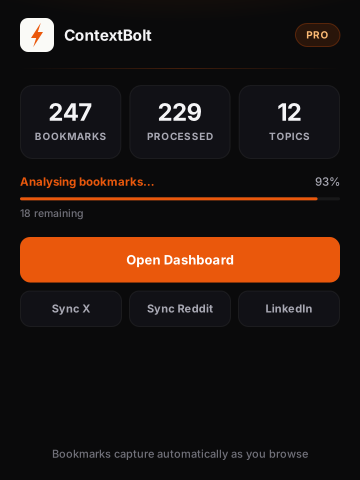
The ContextBolt popup, showing your collection size, how much of it the AI has tagged, and the topics it found. The three buttons force a full re-sync of X, Reddit or LinkedIn.
The other gap it fills is social. ContextBolt keeps the content rather than the link. A web page saves with its article text, and an X, Reddit or LinkedIn post saves in full, so neither breaks when the original is deleted. And for Pro users, the MCP endpoint turns your whole collection into a live tool inside Claude, Cursor, or any MCP client, so you can ask your AI what you have saved mid-conversation.
Raindrop still fits if you want the visual library, with collections, covers and a mobile app, and you curate a grid of links by hand. ContextBolt is built for recall across web and social, and the library fills itself.
- AI tags on every save, searched instantly on-device
- Saves a web page with its text, not just the link
- Captures full X, Reddit, and LinkedIn content too
- AI auto-tagging, no manual filing
- MCP endpoint for Claude, Cursor, and more
- Free Basic is capped at 150 bookmarks, stored locally
- Built to find saves rather than display them, so no visual grid or reader view
- Desktop Chrome, no native mobile app yet
- MCP and the full visible library require Pro ($6/mo)
Best for: people who save from the open web and from X, Reddit and LinkedIn and want instant recall across both, plus anyone using Claude or Cursor who wants their saves available mid-conversation.
Pricing: Free Basic, capped at 150 bookmarks. Pro is $6/month for unlimited bookmarks, cloud sync, and MCP access.
Verdict: the right switch if half your good material is sitting in X bookmarks and Reddit saves Raindrop was never going to see, and the web pages you clip come along with their text. Basic is free, so try it on your next save. The pricing guide covers the cost side.
2. Readwise Reader
Best for heavy readersReadwise Reader is the most complete read-it-later app on the market, and it doubles as a capable bookmark manager. It pulls in articles, PDFs, email newsletters, RSS, and even YouTube transcripts, and it is built around highlighting and a daily review of what you have saved.
Its Ghostreader AI can summarize and answer questions across your library, which is the closest thing here to ContextBolt’s AI layer. The trade is price and focus. It is a paid tool built for people who read a lot, so if you mainly want to file links rather than read them deeply, it is more app than you need.
- Best-in-class reading and highlighting
- Handles articles, PDFs, newsletters, RSS, YouTube
- Ghostreader AI summaries and Q&A
- Daily review keeps saves from rotting
- No permanent free tier, and Reader needs the $12.99 plan
- Overkill if you just want to file links
- Reader is the product; social saves need an integration
Best for: people who read long-form daily and want highlights, not just a list of saved URLs.
Pricing: $12.99/month or $119.88/year for the full plan that includes Reader. Lite is $6.99/month and does not.
Verdict: the upgrade if Raindrop is really being used as a reading queue. See how it stacks up in the three-way comparison.
3. Instapaper
Best for distraction-free readingInstapaper is the minimalist read-later app that has outlasted almost everything in the category. Save an article, get a clean text-only version on any device, and read it offline. It is calm, fast, and free for the core experience.
As a Raindrop replacement it is narrower on purpose. There is no visual grid, no any-URL collections, and no AI. What it does, it does beautifully. If your Raindrop is mostly a pile of articles you mean to read, Instapaper is a lighter home for them.
- Cleanest reading view in the category
- Genuinely useful free tier
- Reliable offline reading and sync
- Stable and well maintained for over a decade
- Articles only, not a general bookmark library
- No semantic search or AI
- No social post capture
Best for: readers who want a calm, offline article queue and nothing more.
Pricing: Free for core reading. Premium is $5.99/month, or $59.99/year, for full-text search, the permanent archive and unlimited notes.
Verdict: a great narrowing if Raindrop felt too busy. Not the tool if you save more than articles.
4. Pinboard
Best for minimalist archivingPinboard is the anti-Raindrop, deliberately plain, text-first, and built to last. It is a one-person operation with a cult following among developers and archivists who value durability over design. The optional archival tier saves a copy of every page you bookmark.
There are no covers, no AI, and no frills. That is the appeal. If you have watched bookmark startups come and go and you just want a fast, permanent, no-nonsense place to keep links, Pinboard is the safe harbor.
- Fast, lightweight, and extremely durable
- Optional full-page archiving
- Simple flat annual fee, no upsells
- Strong tagging and a clean API
- Dated interface, no visual library
- No free tier and no AI
- No native social capture
Best for: developers and archivists who want a permanent, minimalist link store.
Pricing: $22/year, or $39/year for the archival tier. No free plan at all.
Verdict: pick it for longevity, not features. See the ContextBolt vs Pinboard breakdown for the trade.
5. Diigo
Best for annotation + researchDiigo is a research tool first and a bookmark manager second. Its standout feature is in-page annotation. You can highlight text directly on a web page and add sticky notes, then come back to your marked-up version later. For students, academics, and anyone building an argument from sources, that beats a plain link.
The interface shows its age, and there is no semantic search. But for the specific job of reading critically and saving your annotations alongside the source, Diigo does something Raindrop does not.
- In-page highlighting and sticky notes
- Saves your annotations with the source
- Outliner for organizing research
- Free tier, capped at 500 bookmarks lifetime
- Dated interface
- No semantic search
- No native social capture
Best for: students and researchers who annotate as they read.
Pricing: Free with ads, capped at 500 bookmarks and 100 highlights lifetime. Paid is $40/year or $59/year, annual only.
Verdict: the right tool if annotation matters more than recall. Compare it in the ContextBolt vs Diigo guide.
6. Notion Web Clipper
Best for Notion usersIf your knowledge base already lives in Notion, its Web Clipper turns any page into a Notion record in your chosen database. You get Notion’s full power on top, with properties, relations, views, and Notion AI for summarizing what you saved.
It is not a dedicated bookmark manager, so capture is more manual and there is no reading view or social-post handling. But for people who want everything in one workspace, keeping bookmarks there instead of in a separate app is a reasonable trade.
- Everything lives in one Notion workspace
- Full database properties, relations, and views
- Notion AI can summarize saved pages
- Free with any Notion plan
- Manual, clunkier capture than a dedicated tool
- No reading view or offline mode
- No social capture or semantic search across links
Best for: Notion power users who want links inside their existing workspace.
Pricing: Free with Notion’s free and paid plans.
Verdict: the cleanest fit if you already run your life in Notion, as long as you accept that saving is manual and search is keyword. If finding things again is the actual problem, that is the part Notion does not solve.
7. Linkwarden
Best self-hosted optionLinkwarden is the most polished open-source bookmark manager you can self-host. It has collections, tags, full-page archiving (screenshot, PDF, and readable text), and even AI tagging. Run it on your own server and your data never leaves your control.
That ownership is the whole point. The trade is that self-hosting means maintaining a server, and the hosted cloud option is a paid subscription. If “I want to own my bookmarks forever” is your reason for leaving Raindrop, this is the answer.
- Open-source and fully self-hostable
- Archives a screenshot, PDF, and readable copy of every page
- AI-assisted tagging built in
- Free if you host it yourself
- Self-hosting requires technical setup and upkeep
- Cloud version is a paid subscription
- No native social-post capture
Best for: technical users who want to own their data on their own server.
Pricing: Free to self-host, and the hosting bill is yours. Cloud is $4 per user monthly, or $36 per user annually.
Verdict: the best self-hosted Raindrop replacement in 2026. Wallabag is the lighter, read-it-later-focused alternative if you want one.
8. Matter
Best for reading + audioMatter is a beautifully designed read-later app with a standout feature, high-quality text-to-speech that reads your saved articles aloud. It pulls in articles, newsletters, and tweets, and wraps them in a calm reading and listening experience.
As a Raindrop alternative it leans toward consumption rather than archiving or recall. If you save things to actually get through them, especially on a commute or a walk, the audio is genuinely good. If you save things to find them again later, it is not built for that.
- Excellent text-to-speech for articles
- Polished reading and design
- Pulls in articles, newsletters, and tweets
- Built for reading, not retrieval
- Limited free tier, premium around $8/month
- No semantic search across a big archive
Best for: people who want to listen to their saved reading on the go.
Pricing: Limited free tier. Premium around $8/month.
Verdict: a lovely consumption layer. Pair it with a recall tool rather than relying on it to find things.
How to choose the right Raindrop alternative for you
Pick the line that sounds most like your situation.
- If your collection has outgrown keyword search, pick ContextBolt. AI tagging, instant search over it, and the MCP endpoint solve the “I know I saved this somewhere” problem that manual tags cannot.
- If you save from the web and from X, Reddit and LinkedIn, pick ContextBolt. It is the only tool here that captures X, Reddit and LinkedIn saves alongside web pages, and it keeps the page text rather than a fragile link.
- If Raindrop is really your reading queue, pick Readwise Reader for power or Instapaper for calm simplicity.
- If you annotate as you research, pick Diigo. Highlights on the page beat a bare bookmark.
- If you want to own your data forever, self-host Linkwarden.
- If everything you do already lives in Notion, use the Web Clipper and keep one workspace.
- If you want listening, not just reading, Matter’s audio is the best in the category.
Most of these install in minutes with no lock-in, so the smart move is to try the one that targets your specific frustration with Raindrop. Try the free tier of ContextBolt if recall is the problem. The only metric that matters is whether you can find what you saved when you need it.
Is Raindrop.io still worth using?
For a lot of people, yes. If you mainly curate web links into a clean visual library by hand, want a generous free tier, and do not need AI search or social capture, Raindrop still does that job well.
The alternatives on this list win on specific edges Raindrop does not cover, including meaning-based search, full social-post capture, deep reading, annotation, and self-hosting. Match the tool to the edge you actually care about. If that edge is recall across a large, social-heavy collection, that is exactly the gap ContextBolt was built to fill. Basic is free with no account, so the test costs you one save, and the three-way comparison with Readwise is the best place to see the difference in detail.
If you are also weighing pure reading apps, the companion guide to the best Pocket alternatives in 2026 goes deeper on that side of the category. And if annotation is the edge that matters most to you, the Markwise alternatives comparison covers the tools that keep highlights and saves in the same library.